Step-by-Step Guide to Online GST Registration Process
Businesses and individuals can complete the entire procedure through the official GST portal in the following manne
Step 1: Generating Your Temporary Reference Number (TRN)
The first stage of GST registration involves generating a Temporary Reference Number (TRN), which acts as a temporary identifier for your application.
- Access the GST Portal: Begin by navigating to the official GST website: gst.gov.in.
- Initiate New Registration: On the homepage, click on the “Services” tab, then select “Registration,” and finally choose the “New Registration” option.
- Fill Basic Details (Part A): On the registration page, select “Taxpayer”, choose your State and District, enter your business name and PAN. Then add a valid email and mobile number, complete the Captcha, and click “PROCEED”.
- OTP Verification and TRN Generation: You will receive separate One-Time Passwords (OTPs) on the provided mobile number and email address. Enter these OTPs for verification. Upon successful validation, a Temporary Reference Number (TRN) will be generated and displayed on your screen.
Step 2: Log in with TRN
Go to the GST portal, choose “New Registration” > “TRN”, and log in using the OTP sent to your registered email and mobile.
Step 3: Access Saved Application
Click on “My Saved Application” and use the edit option to continue filling out Form GST REG-01.
Step 4: Fill in Business Details
Enter your trade name, business type, district, codes, and dates for business start and GST liability. Choose the Composition Scheme if eligible.
Step 5: Promoter/Partner Info
Add details of promoters/partners like name, PAN, Aadhaar, contact, and DIN (if applicable).
Step 6: Authorized Signatory
Provide details and documents for the person handling GST compliance on behalf of your business.
Step 7: Business Address
Enter your main business address, upload proof, and mention any additional business locations.
Step 8: Goods & Services
List the goods/services you deal in with their HSN/SAC codes.
Step 9: Bank Details
Submit your bank account number, IFSC, and upload a cancelled cheque or statement.
Step 10: State-Specific Info
Add any additional information required by your state, if applicable.
Step 11: Aadhaar Authentication
Choose to verify via Aadhaar for faster processing, or skip and undergo manual verification.
Step 12: Final Submission
Review all details, tick the declaration, and submit using DSC, e-Sign, or EVC as per your business type. Once you successfully submit your GST registration application, you’ll receive an Application Reference Number (ARN) as confirmation.
This unique 15-digit number is crucial for tracking the status of your application online and will be sent to your registered email address and mobile number.
GST Registration Timeline and Validity
The time taken for the GST registration process varies based on several factors
- With Aadhaar Authentication: Usually approved within 3–7 working days. If no action is taken by the officer in 7 days, it’s auto-approved.
- Without Aadhaar Authentication: The process may take 21–30 days or more due to possible physical verification or additional document checks.
Factors Affecting GST Registration Timeline:
- Incomplete or Incorrect Info: Mistakes or missing details cause delays.
- Document Checks: Authorities verify all documents carefully.
- Business Type: Some entities may take longer (e.g., Casual Taxable Persons, DSC users).
- Government Load: High volumes can slow down processing.
- Delayed Response to Queries: Taking too long to respond to clarification requests from the GST officer can extend the timeline.
The validity of a GST registration certificate varies depending on the type of taxpayer:
- Regular Taxpayers: GST registration is permanent unless cancelled or surrendered; no renewal needed if compliance is maintained.
- Casual Taxable Persons: Registration is temporary and valid for 90 days, which is extendable by another 90 days.
- Non-Resident Taxable Persons: Registration is valid for the period mentioned in the certificate or as per the GST payment duration, whichever is shorter.
GST Registration Fees and Penalties
The registration fees may vary depending on different scenarios:
- Most Regular Businesses: There is no government fee for GST registration. No additional requirements apply.
- Casual Taxable Persons: While registration itself is free, applicants must submit a security deposit ranging from ₹500 to ₹10,000, depending on the nature of the business and state-specific rules.
- Non-Resident Taxable Persons: Registration is also free, but a mandatory security deposit between ₹500 and ₹10,000 is required. This applies to temporary or foreign business entities operating in India.
So, if a business crosses the GST threshold and fails to register, it can face heavy penalties along with interest on unpaid tax.
- General Penalty: ₹10,000 or 10% of the tax due — whichever is higher.
- In Case of Fraud/Deliberate Evasion: ₹10,000 or 100% of the tax due — whichever is higher.
GST Registration Renewal & Cancellation
For regular taxpayers, GST registration generally has no expiry date, and therefore, no separate renewal process or fees are required. Their GSTIN remains valid indefinitely, provided they regularly meet compliance requirements like timely return filing and tax payment.
This continuous compliance effectively serves as the “renewal” for regular taxpayers.
The following factors need to be considered as well:
- For Casual Taxable Persons and Non-Resident Taxable Persons (NRTPs), GST registration is temporary and has a limited validity period (typically 90 days or a specified period).
- These categories may require an extension or fresh registration if they continue their taxable activities beyond the initial validity period.
GST registration can be cancelled either voluntarily by the taxpayer or initiated by a GST officer due to non-compliance or other valid reasons.
The reasons for cancellation are likewise:
Voluntary Cancellation (by Taxpayer):
- Discontinuance or closure of the business.
- Transfer of business due to amalgamation, merger, de-merger, sale, lease, or other disposal (the transferee must get registered).
- Change in the constitution of the business leading to a change in PAN (e.g., proprietorship converting to a company).
- The annual aggregate turnover falls below the prescribed threshold limit for mandatory registration.
- Death of the sole proprietor.
- A business that voluntarily registered but did not commence business within six months of registration.
Cancellation by GST Officer (Suo Moto):
GST officers have the authority to cancel registration if they find non-compliance or fraudulent activities. Common reasons include:
- Failure to file GST returns for a specified continuous period (e.g., six periods for regular taxpayers, three quarters for composition dealers).
- Issuing invoices or bills without the actual supply of goods or services, or claiming Input Tax Credit fraudulently.
- Obtaining GST registration through fraud, willful misstatement, or suppression of facts.
- Not conducting any business from the declared place of business.
- Violating any provisions of the GST Act or Rules.
It is crucial to note that GST registrations cannot be cancelled without filing all pending returns. Only then can they apply for cancellation by submitting Form GSTR-10 (Final Return).
Here‘s how GST Registration can be cancelled:
- Step 1: Log in to the GST Portal: Visit www.gst.gov.in and log in with your user ID and password.
- Step 2: Navigate to Cancellation Application: Go to “Services” > “Registration” > “Application for Cancellation of Registration”.
- Step 3: Fill Application Details (Form GST REG-16): The application form (GST REG-16) will be displayed. Fill in all the required fields and apply.
- Step 4: Verification and Approval: The tax officer will verify the application and supporting documents. If satisfied, the officer will issue an order for cancellation in Form GST REG-19 within 30 days of the application. The cancellation will be effective from the date determined by the officer.
- Step 5: File Final Return (GSTR-10): After the cancellation order is issued, the taxpayer must file a final GST return in Form GSTR-10 to clear any pending liabilities.
If the cancellation is initiated by the GST officer, a show-cause notice (Form GST REG-17) will be issued first, providing the taxpayer an opportunity to respond and explain why their registration should not be cancelled.
Post-Registration: GST Compliance and Return Filing
Adhering to GST regulations is crucial for smooth operations and to avoid legal consequences and penalties. GST compliance broadly includes key categories that businesses must diligently follow:
- Keep GST Info Updated: Update any business changes like address or activity on the GST portal.
- Maintain Records: Keep accurate books, invoices, and e-way bills for at least 6 years.
- Issue GST Invoices: Provide GST-compliant invoices with all required details for each sale.
- File GST Returns: Submit monthly, quarterly, and annual GST returns on time.
- Pay Collected GST: Deposit collected GST to the government promptly.
- Generate E-Way Bills: Required for goods movement over ₹50,000.
- HSN/SAC Codes: The correct application of HSN codes (for goods) and SAC codes (for services) on tax invoices and in GST return filings is mandatory.
All businesses registered under GST are generally mandated to file various GST returns, with the frequency (monthly, quarterly, or annually) depending on their turnover and the scheme they have opted for.
GST Registration Certificate
A GST Registration Certificate is an official document issued by the GST Department upon successful registration of a business under the GST system in India. It serves as legal proof that your business is recognized and registered to collect and remit GST.
Key Details Included Under the GST Registration Certificate:
- GSTIN (Goods and Services Tax Identification Number)
- Legal Name and Trade Name of the Business
- Constitution of Business (Proprietorship, Partnership, etc.)
- Business Address
- Date of Registration
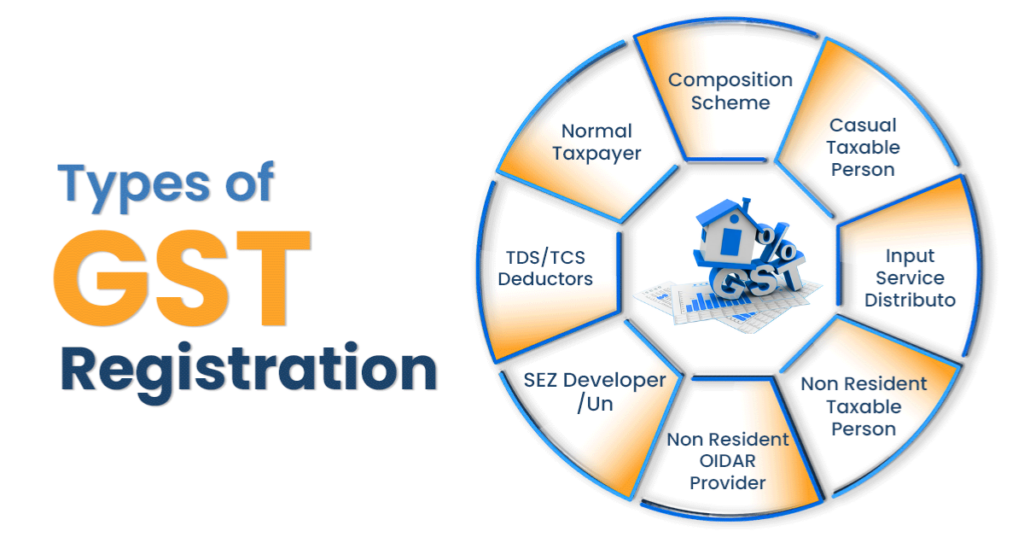
- Type of Registration (Regular, Composition, Casual, etc.)
How to Download Your GST Registration Certificate (Form GST REG-06)
Upon successful approval of your GST registration application, the GST authorities issue a certificate of registration in Form GST REG-06.
The physical copy is not provided by the authorities; it can only be downloaded from the GST Portal. To download your GST Registration Certificate:
- Step 1: Log in to the GST Portal: Visit gst.gov.in and log in using your valid credentials (username and password).
- Step 2: Navigate to Certificates: After logging in, click on “Services” > “User Services” > “View/Download Certificates”.
- Step 3: Download: The screen will display all certificates issued by the GST authorities. Locate “Registration Certificate (Form GST REG-06)” and click the “Download” icon under the “Download” column.
- Step 4: Open and Print: The certificate will be downloaded in PDF format. You can then save it to your device or print a physical copy for your records.